
Device compliance and its importance within conditional access policies.
Threat actors are increasingly utilizing token theft as a technique to compromise corporate accounts without needing to satisfy multifactor authentication requirements. The level of skill required to perform token hijacking is low, making it even more attractive. John Hammond has an awesome video exploiting it which can be found here.
Recently, Microsoft deployed token protection in preview as a mitigation to this, and overall it works quite well. Essentially, access tokens are bound to the initiating device using software key binding or hardware security module binding where available. Unfortunately, and like I said this is still in preview and could change, it can be quite disruptive. A quick example of it’s disruption would be the conditional access policy blocking authentication from SharePoint to Power Bi.
Luckily, we have the ‘require device to be marked as compliant’ grant control to fall back on!
What is device compliance?
Device compliance policies define the baseline that a device must be configured to in order to gain compliance. For example within Windows, a compliance policy may require real-time protection to be enabled for an end-users device to be seen as compliant. Combine this with conditional access, exactly how we will be doing, and you have an enhanced security posture!
Creating the conditional access policy.
Depending on the current state of your organisation, the creation of the conditional access policy can be slightly different. For example, all mobiles may be corporately owned and not BYOD, allowing you to add the device platforms for mobiles.
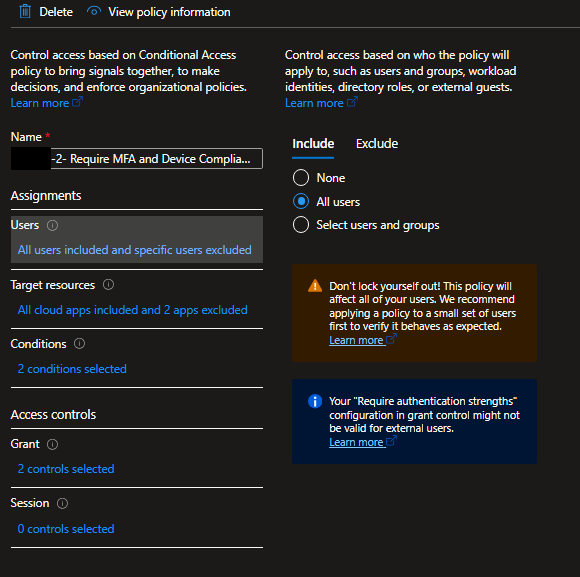
As seen above, my policy is deployed towards ‘All users’. Exclusions may need to be added depending on your structure, for example allowing guest users.
Target resources : All cloud apps included, Microsoft Intune Enrollment application excluded (this is so we don’t break anything during device onboarding)
Conditions : For device platforms I have Windows and macOS. If you manage your phones within Intune you should include Android and iOS. We have an additional conditional access policy that blocks Linux and Windows Phone as they’re unsupported OS’.
Grant : We have two grant controls enabled, ‘require authentication strength’ for our MFA requirements and ‘Require device to be marked as compliant’ for defence against token hijacking. ‘For multiple controls’ should also be set to ‘require all the selected controls’.
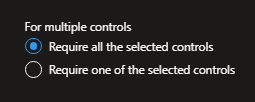
It is incredibly important within grant controls on the ‘For multiple controls’ option to have ‘Require all the selected control's’ selected. If not the additional defence the device compliance feature offers becomes obsolete.